BlockHound
Detecting Blocking Calls in Reactive Java Applications
BlockHound is a Java agent library designed to detect blocking calls in reactive code. In reactive programming, blocking operations can severely impact application performance and scalability, yet they can be difficult to identify during development.
What is BlockHound?
BlockHound works by instrumenting JVM bytecode to detect when a blocking method is called from a non-blocking thread. It integrates with Project Reactor and other reactive libraries to enforce the non-blocking nature of reactive applications.
Basically it allows to check whether a blocking call occurs in a thread it shouldn’t happen and throws an exception at runtime when it happens.
Key Features
- Runtime Detection: Identifies blocking calls during runtime rather than compile time
- Integration: Works with Project Reactor, RxJava, and other reactive frameworks
- Customizability: Allows custom configuration for specific blocking calls to ignore or monitor
- Minimal Overhead: Designed for use in both development and production environments
How It Works
BlockHound uses bytecode instrumentation to monitor method invocations on reactive threads. When a reactive thread executes a potentially blocking call, BlockHound throws an exception with a detailed stack trace, helping developers identify and fix the issue.
// Add BlockHound to your project
BlockHound.install();

// This will throw an exception if run on a reactive thread
Mono.delay(Duration.ofSeconds(1))
    .doOnNext(it -> {
        try {
            Thread.sleep(10);  // This is a blocking call!
        } catch (InterruptedException e) {
            throw new RuntimeException(e);
        }
    })
    .block();
Implementation
Adding BlockHound to your Java project requires a few simple steps:
1. Add the Dependency
<!-- BlockHound -->
<dependency>
    <groupId>io.projectreactor.tools</groupId>
    <artifactId>blockhound</artifactId>
    <version>$LATEST_RELEASE</version>
</dependency>

LATEST_RELEASE: 1.0.11.RELEASE (CURRENT)
2. Install BlockHound
Install BlockHound early in your application lifecycle:
// In your main method or test setup
static {
    BlockHound.install();
}
3. Customize as Needed
BlockHound.builder()
    // Allow certain blocking calls
    .allowBlockingCallsInside("com.example.SafeClass", "methodName")
    // Mark additional methods as blocking
    .markAsBlocking("com.example.RiskyClass", "slowMethod", "This method is blocking")
    .install();
Benefits
- Improved Performance: Identify unexpected blocking calls that could harm application performance
- Better Scalability: Ensure your reactive application scales effectively by maintaining non-blocking behavior
- Earlier Detection: Find issues during development and testing rather than in production
- Educational Tool: Help developers understand and follow reactive programming principles
Common Blocking Operations to Watch For
- File I/O operations (java.io.*)
- JDBC operations and database calls
- Thread.sleep() and similar timing methods
- Synchronous HTTP client calls
- Locks and synchronized blocks
By incorporating BlockHound into your development workflow, you can ensure that your reactive applications remain truly non-blocking, providing the performance and scalability benefits that reactive programming promises.
DK13+ support
for JDK 13+, it is no longer allowed redefining native methods. So for the moment, as a temporary work around, please use the -XX:+AllowRedefinitionToAddDeleteMethods jvm argument:
Maven
    <plugin>
        <groupId>org.apache.maven.plugins</groupId>
            <artifactId>maven-surefire-plugin</artifactId>
                <version>2.22.2</version>
                <configuration>
                    <argLine>-XX:+AllowRedefinitionToAddDeleteMethods</argLine>
                </configuration>
    </plugin>
We can use IDE also for this instead of the pom change in local only
-XX:+AllowRedefinitionToAddDeleteMethods
This can be done by specifying it in your IDE’s run configuration or adding it to your build tool’s settings. If you are using IntelliJ IDEA, go to Run -> Edit Configurations -> Modify Options -> Add VM Options and add the above option.
Added configuration file to initiate BLockHound into the Application , We just can add into main application also.
BlockHound.install()
@Configuration
public class BlockHoundConfig {

    @PostConstruct
    public void init() {
        BlockHound.install(builder -> {
            builder.allowBlockingCallsInside("java.util.UUID", "randomUUID")
                    .allowBlockingCallsInside("javax.net.ssl.SSLEngine", "wrap")
                    .allowBlockingCallsInside("javax.net.ssl.SSLEngine", "unwrap");
        });
    }
}
BlockHound doesn’t throw on every blocking call but only on such calls that happen on threads that should be non-blocking. To mark a thread as non-blocking, we need to configure a predicate.
Throwing error
Exception in thread "main" reactor.blockhound.BlockingOperationError: \
  Blocking call! java.lang.Thread.sleep
	at java.base/java.lang.Thread.sleep(Thread.java)
	at ch.frankel.blog.blockhound.B.main(B.java:11)
BlockHound JAR is self-contained. The only dependency is ByteBuddy, which BlockHound shades.
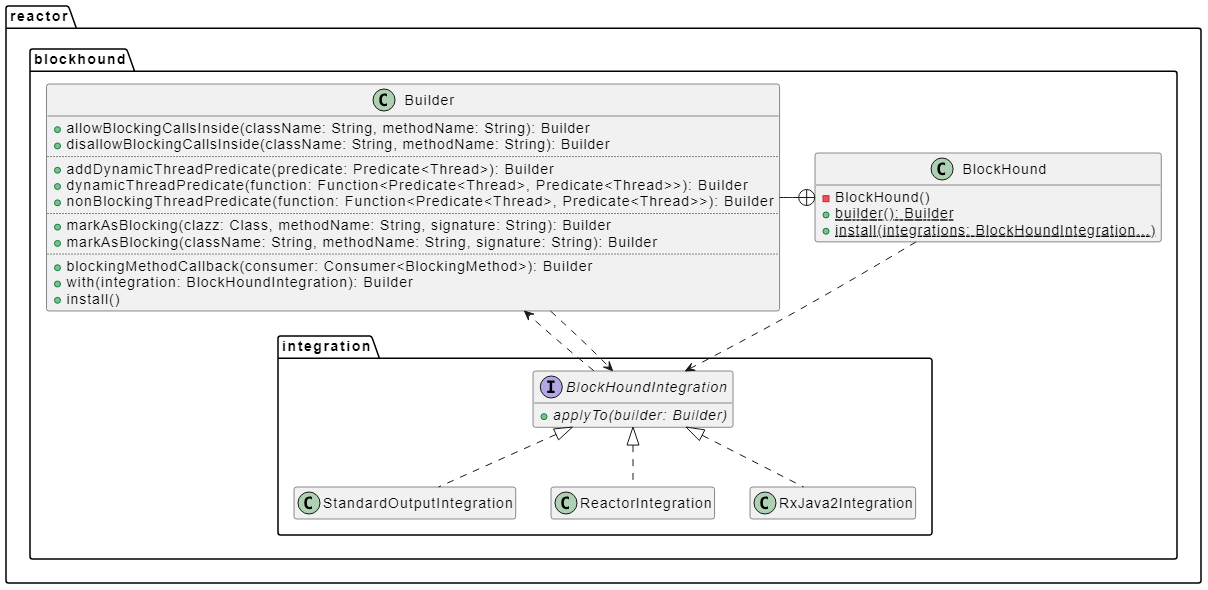
The BlockHound workflow
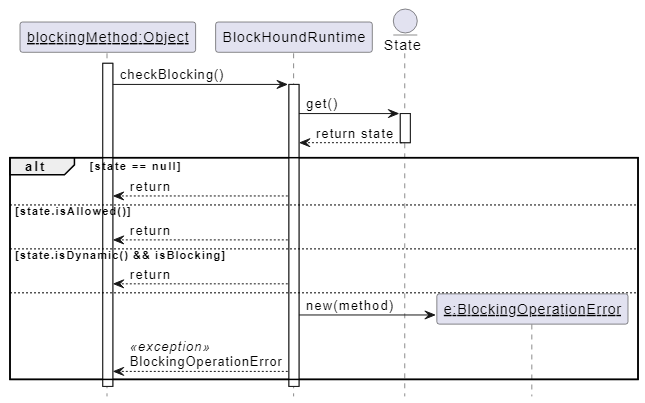
- If the call is allowed, the flow continues normally.
- If the call is dynamic, it also continues normally.
- Otherwise, i.e., the call is blocking and not dynamic, BlockHound throws.
Using BlockHound is straightforward. A short explanation is that BlockHound is a Java agent.