How to install Maven in Windows
Maven is a build automation tool used primarily for Java projects. Maven can also be used to build and manage projects written in C#, Ruby, Scala, and other languages. The Maven project is hosted by the Apache Software Foundation, where it was formerly part of the Jakarta Project. -google
Simple 5 step guild to get installed maven in your Windows PC.
- Download maven project into your device.
follow this link and download maven project, I recommend you to download Binary zip archive. Because only Binary projects got bin folder which will make us really easy to config maven.
-
Extract the zip file in to Program files. (Recommended location: C:\Program Files\maven)
-
Now you can navigate to extracted folder and get the location address of it's bin folder. (C:\Program Files\maven\apache-maven-3.8.4\bin)
-
Add the bin directory to the PATH environment variable.
For process this task you can search on windows "advanced system settings" and you will find View advanced system settings. open it then click on Environment Variables... After that you will see this...
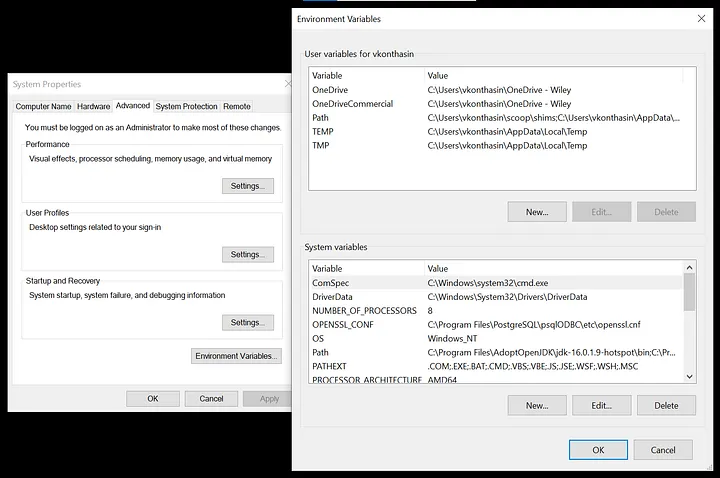
Then you need edit Path variable on System variables. Add the copied directory in to the given space. That's it!

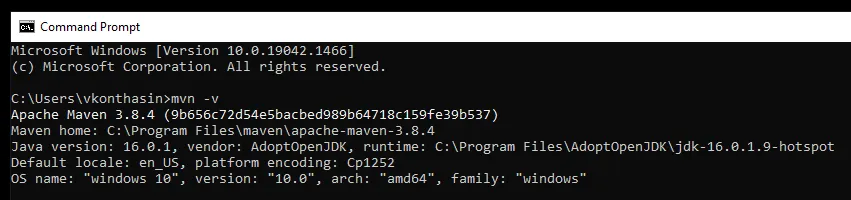
- Finally you can check whether it worked or not. Confirm with mvn -v in a new cmd. The result should look similar to this...
Happy Coding!